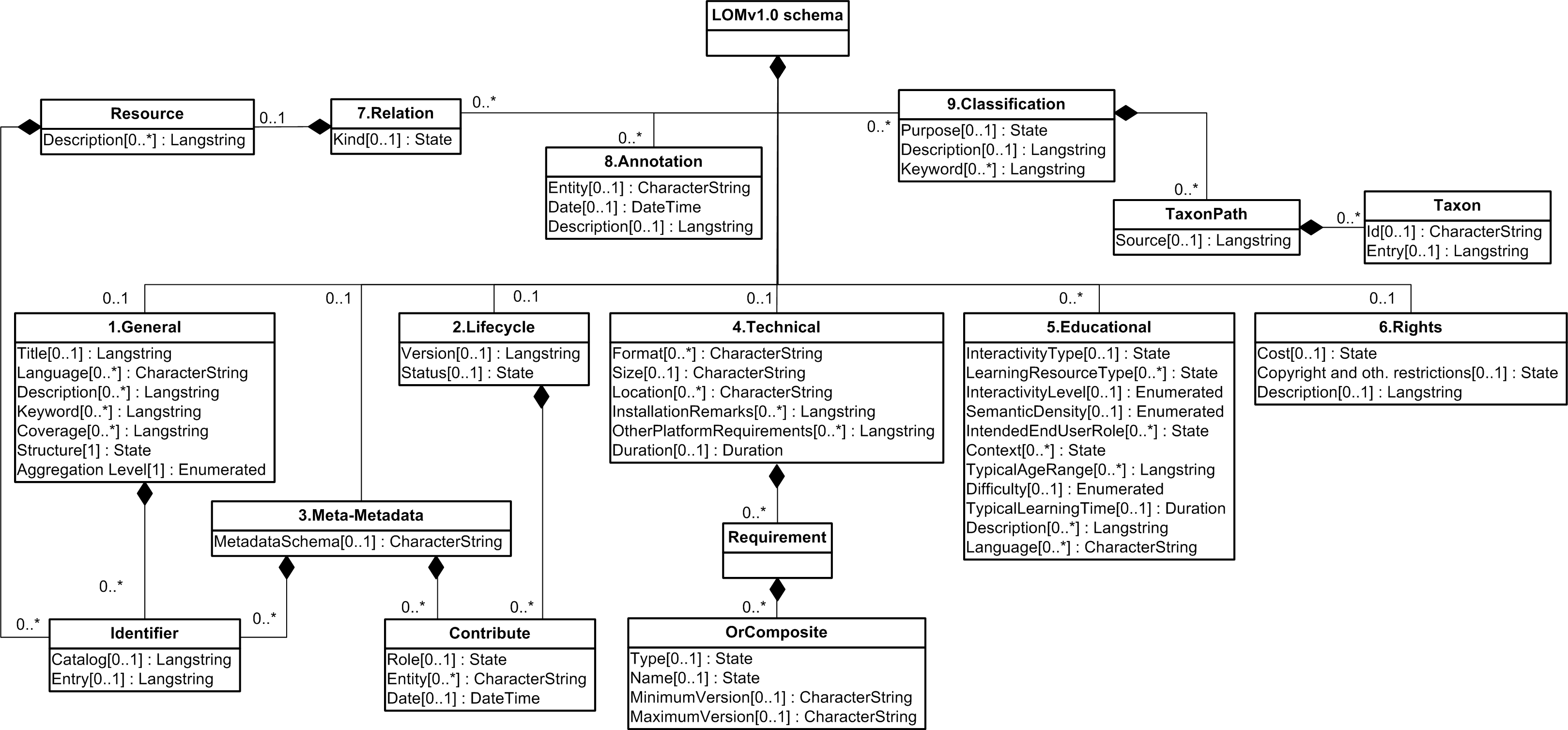
Yes - seems possible to extend the LOM to create new elements - but also keeping some 'standard' metadata.
See: http://www.imsglobal.org/metadata/mdv1p3pd/imsmd_bestv1p3pd.html#1622010
See: http://www.inigraphics.net/press/topics/2004/issue6/6_04a04.pdf
Presentation: http://www.jisc.ac.uk/uploaded_documents/jpm_lomcore.ppt
Thursday, 9 October 2008

Wednesday, 8 October 2008
Possible problem with Word XML
Annoyingly I have noticed that Word repeats parent element tags when you mark up - even elements that should be declared once.
This is annoying as it breaks the element tree - but both Word and HIVE seem to validated it fine!!!
See: http://www.snee.com/bobdc.blog/2007/05/word_2003s_awful_xml_for_index.html
Oh well - may be something to repair here!!
Will investigated.
This is annoying as it breaks the element tree - but both Word and HIVE seem to validated it fine!!!
See: http://www.snee.com/bobdc.blog/2007/05/word_2003s_awful_xml_for_index.html
Oh well - may be something to repair here!!
Will investigated.
Thursday, 2 October 2008
Similiar Project Reflections
 See: http://metadata.cetis.ac.uk/usage_survey/cs_hlsi.pdf
"Use is made of granularity (vocabulary is {object, page, document} ) although this information is not stored in the IMS metadata record. The materials are stored in folder systems to represent the hierarchy. i.e. document folders contain pages and pages contain objects."
An interesting comment - may be worth looking into doing this for this project - as we have the option - see image.
Their specific reflections (I have experienced some of this too)
"Several versions of the IMS specification were looked at during the course of the project. Some problems with the specification were:
Examples
The examples given for how to use the elements were unclear,
particularly in the earlier documentation.
Best Practice Guidelines
There were not enough best practice guidelines.
Unclear Explanations
The catalog entry field caused some confusion initially. It was unclear if catalog and catalog entries were to be used for external searching.
New Versions
The IMS specification changed several times during the course of the project. It is quite difficult to automate the processes of upgrading and downgrading, particularly when vocabularies changed and when the specification changed to allow more than one lifecycle contributor."
Annotation 8.0 Element in LOM
This is a recommended element for the following purposes:
"This category provides comments on the educational use of this learning object, and information on when and by whom the comments were created. This category enables educators to share their assessments of learning objects, suggestions for use, etc."
"Implementers and educators SHOULD aspire to using the annotation category elements as they have the potential to significantly enhance the richness of the metadata instance by recording additional qualitative and quantitative information about the resource and its usage."
8.1 Entity = Entity (i.e. people, organisation) that created this annotation.
8.2 Date = Date that this annotation was created.
8.3 Description = The content of this annotation.
This may be very valuable in collecting the specific details of the validation document.
"This category provides comments on the educational use of this learning object, and information on when and by whom the comments were created. This category enables educators to share their assessments of learning objects, suggestions for use, etc."
"Implementers and educators SHOULD aspire to using the annotation category elements as they have the potential to significantly enhance the richness of the metadata instance by recording additional qualitative and quantitative information about the resource and its usage."
8.1 Entity = Entity (i.e. people, organisation) that created this annotation.
8.2 Date = Date that this annotation was created.
8.3 Description = The content of this annotation.
This may be very valuable in collecting the specific details of the validation document.
Wednesday, 1 October 2008
Hidden Knowledge
See: http://www.idi.ntnu.no/~lfedvard/phd/Webist_presentation.ppt
This is a very good presentation about the issues of metadata and some associated issues.
Mapping the Document fields to metadata - useful diagram
http://upload.wikimedia.org/wikipedia/commons/1/14/LOM_base_schema.png
Link to understanding metadata LOM fields
http://www.cetis.ac.uk/profiles/uklomcore/uklomcore_v0p3_1204.doc
** Back to DIVAS after working on start of term jobs - VLE **
This is a very good presentation about the issues of metadata and some associated issues.
Mapping the Document fields to metadata - useful diagram
http://upload.wikimedia.org/wikipedia/commons/1/14/LOM_base_schema.png
Link to understanding metadata LOM fields
http://www.cetis.ac.uk/profiles/uklomcore/uklomcore_v0p3_1204.doc
** Back to DIVAS after working on start of term jobs - VLE **
Monday, 8 September 2008
Some Success!!
 After some weeks of searching, experimenting and generally (seemingly) getting nowhere, If have finally (thanks to JISC forums & Sam Rowley) have worked out a way to get Word docs marked up against a Metadata Schema and an XML files created - which can then be used to populate Metadata field in the HIVE repository.
After last week's meeting, it was agreed that we would use/explore the IEEE LOM metadata scheme for learning items.
See: http://standards.ieee.org/reading/ieee/downloads/LOM/lomv1.0/xsd/
Marking up Word docs for Metadata (XML)
 I was working on applying a schema to a Word doc for the purpose of marking up in order to create an xml file from it. Thankfully, I managed to get Word to recognize and validate the schema I was trying to use in Word. I managed to get this to work by downloading all the xsd files from the IEEE standards website and recreating the file structure (as referenced in the xsd files too) in my local drive - see image right.
To apply a schema - go to 'Tools' > 'Templates and Add-ins' > 'Add Schema' (Word 2003)
It is a bit buggy (I don't know whether the LOM schema are written well) - anyway to get around problems of Word not finding missing 'namespaces' or some not being declared well - I used the following in conjunction with the primary lom.xsd:
- extend\custom.xsd
- unique\loose.xsd
- vocab\loose.xsd
To start - apply the schema to the whole document - then highlight text and select the LOM element it is to be marked up with.
 One thing of note - Word does not like you to have any extraneous text/data in the Word doc before you 'save-as' XML doc (save data only). If you do not want the bother with removing this 'extra text/data' - you can force Word to save the XML file without validating the schema (see XML options). This doesn't seem to compromise the process of using this XML file to populate the Metadata fields when uploading a document to HIVE (using the Harvest Road Explorer 3.0 screen).
The schema type I told HIVE I was supplying is IMS 1.3.
The image supplied shows the validation screen in Word for the XML metadata bindings - the 'X' logo indicates that there is a validation issue - this disappears when you get rid of the extra 'un-marked-up' text/data.
If you want more details about this 'uploading' of files to Hive using Harvest Road Explorer and the XML files - please see previous Blog entries.
Friday, 29 August 2008
Extracting Data from Word
 A bit of a 'interesting' aside today - looking at a 'low-cost' process for exporting some data from Word files.
Marking up Word Docs
As part of my investigation into meta-data, Chris Gray has sent 20 Programme Specification documents to look at. One key issue is the related to consistency, in so much as the data entered is either missing (not known or required) or is not in a set format.
 In response to this, in order to get consistency there may be a need to review the data and process it for purpose. Luckily, word does allow areas of text to be marked up using XML tags and then the whole document saved as an xml 'data file'.
The Marking up process
[1] Firstly, an xsd file needs to be created - this is a XML Schema file that contains the elements of the schema to be used for marking up (sadly I cannot find a Dublin Core version - so I am using one that I have written myself) - ProgSpec.xsd.
 [2] Open a Word file then go to Tools > Templates and Add-ins > XML Schema Tab > add schema
Apply the schema to the whole document. After this - it is a simple act of just highlighting the text of the document then selecting which element in the schema tree it is to be marked up with.
Once the document has been marked up - saved it as an xml file, but make sure you select 'save data only' as this removes all presentation information that Word generates.
 When you view this document in a web browser - you will see the 'pure' data that you have marked up.
What this file gives you is an xml document that can be used to extract data from.
This process would obviously be a lot easier (and not necessary) if the document was already marked up.
Subscribe to:
Posts (Atom)